Review-brief export
When you spot something a server should change, flag it, jot what needs to change, choose how much context to include, and export a Markdown review brief to hand straight to a coding agent.
Flag an item
Section titled “Flag an item”Use the Flag button in the Inspector (or flag from the catalog). A flagged item shows an amber “Flagged for changes” box with:
- A note field — “What needs to change? This becomes the task for the coding agent…”
- An Include chip row — Description · Schema · Input · Response — each toggled on or off. A chip is disabled with a tooltip when its context isn’t available yet (e.g. “Run it first to capture a response”), so Input and Response snapshot what you actually ran.

Export the brief
Section titled “Export the brief”The top-bar Export brief button (with a flag-count badge) opens the Review brief modal — “{n} flagged items across {m} servers” — with Copy markdown, Clear all flags, and Close.
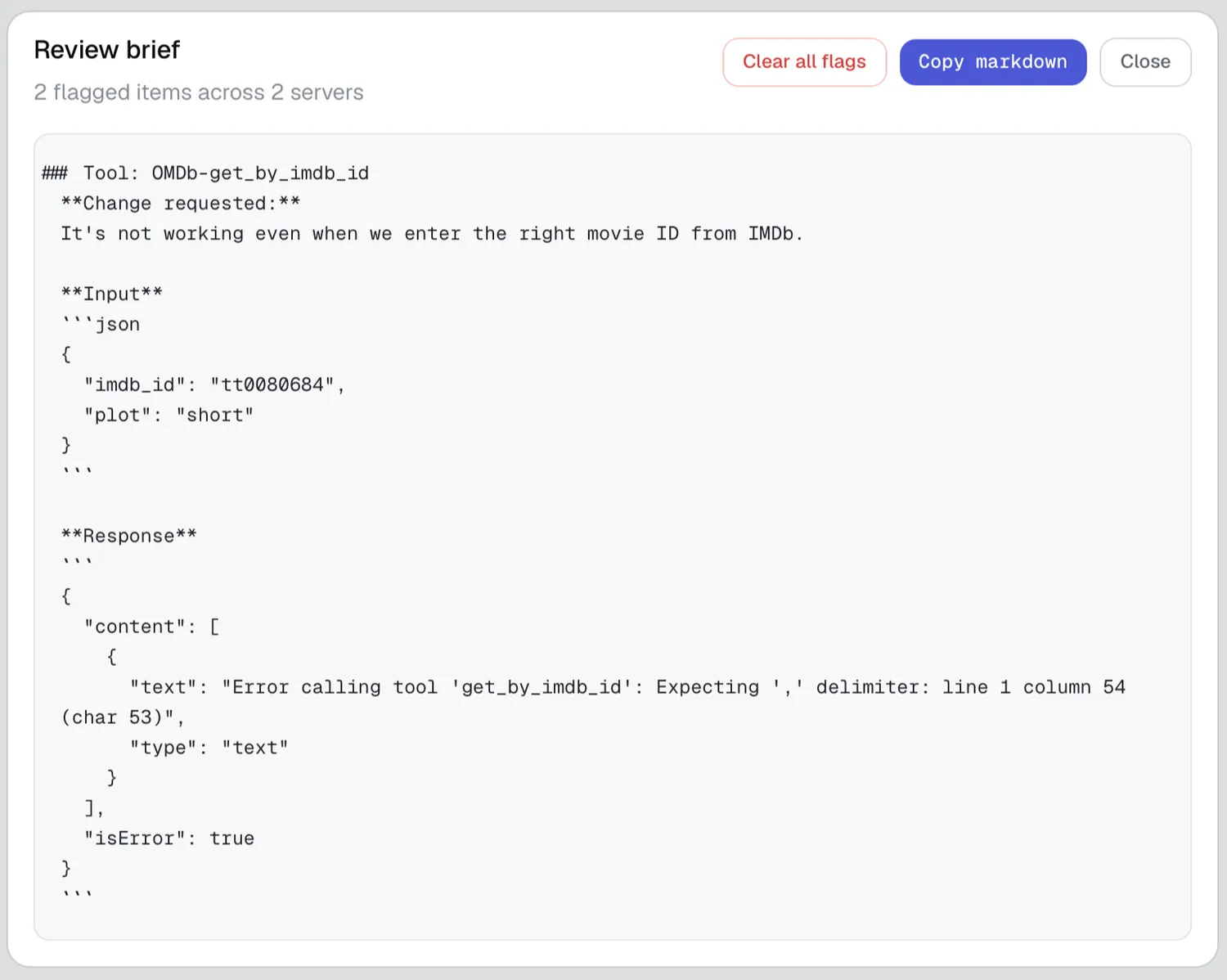
The exported Markdown looks like this:
# MCP Review Brief3 items flagged · generated by MCP Peek
## mcp server: my-server (HTTP)
### Tool: search_engine**Change requested:**it returns empty for valid queries
**Description**…**Schema**- `query` (string, required) — the search query**Input**```json{ "query": "…" }```**Response**```…captured result…```